How it works
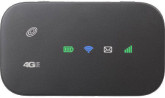
Nearly all mobile carriers offer pocket-sized hotspot devices that connect to the cellular data network and then create a local Wi-Fi network for devices like ViewClix.
When you use a ViewClix frame with a mobile hotspot, Wi-Fi setup works the same way as it does on a standard home network. Once the hotspot is powered on and broadcasting Wi-Fi, the frame connects to it like any other router.
How much data does ViewClix use?
ViewClix is designed to use hotspot data efficiently. Shared photos download once to the frame, and the always-on connection uses very little data on its own.
Video calling uses the most data, at about 7 MB per minute. A 1 GB monthly plan is usually enough for about two hours of video calling plus roughly 200 shared pictures.
How do I get a hotspot and plan?
You will need to contact a mobile provider for the hotspot device and data plan. Many providers offer prepaid plans so you can avoid a long contract, and some offer automatic refill options for convenience.
Provider information
Important setup tips
Secure the hotspot
Some hotspots ship with an open Wi-Fi network and no password. If that is the case, follow the hotspot’s instructions to add a password so other people cannot use your data.
Turn off hotspot sleep mode
Some hotspots automatically disable Wi-Fi after a period of inactivity. If possible, disable that sleep setting so the frame stays connected reliably.
Keep the hotspot powered
Hotspots are battery-powered, so the simplest setup is to leave the hotspot plugged in all the time. You can also power some hotspots from the USB port on the back of a ViewClix frame.